Which Python Book Is Best for Beginners?
The best Python book for beginners depends on what “beginner” means for you. Someone writing their first line of code needs help with setup and basic programming ideas. Someone who already knows another language may need a faster introduction to Python’s syntax and tools.
Among the supplied Digital Delights catalog titles, Python Illustrated is a sensible starting choice for a complete beginner who wants visual explanations and guidance from initial setup. If you prefer a structured practice schedule, consider 100 Days of Coding in Python. If you want a broader foundations text that extends into testing and object-oriented programming, consider Basic Computer Coding: Python (3rd Edition).
These are fit-based editorial recommendations, not a tested ranking. Below, you will find the differences that matter, a comparison with other researched titles, and a practical way to turn reading into coding.
The best Python book for beginners: a quick answer
If you have never programmed, prioritize a book that explains how to run code before asking you to build something complicated. Installation, saving a file, interpreting an error, and understanding a loop are part of learning—not obstacles you should already know how to solve.
- For illustrated explanations: Python Illustrated by Maaike van Putten, illustrated by Imke van Putten. The catalog describes a beginner-focused approach with visual explanations, terminal guidance, installation checks, a first program, and Visual Studio Code setup.
- For a paced learning routine: 100 Days of Coding in Python by Giuliana Carullo. Its documented structure combines theory, practice, and repeated exercises in a day-by-day sequence.
- For broad programming foundations: Basic Computer Coding: Python (3rd Edition) by Lavinia Iancu. Its listed coverage starts with setup and syntax and extends to modules, files, exceptions, testing, and object-oriented programming.
The deciding question is not “Which book contains the most topics?” It is “Which book gives me a manageable next step and enough practice to understand it?” A broad reference can be useful later while still being a poor match for your first study session.
Compare Python books by your starting point and goal
The table below compares the catalog options by their documented structure. The trade-offs are editorial interpretations of that scope, not findings from classroom trials or firsthand testing.
| Catalog title | Likely reader fit | Documented focus | What to consider |
|---|---|---|---|
| Python Illustrated | New programmers seeking visual explanations | Illustrated instruction, introductory setup, first programs, and core coding concepts | Check a sample to see whether the visual approach helps you follow the code. |
| 100 Days of Coding in Python | Learners who want a regular practice sequence | Python basics, repeated exercises, algorithms, data structures, and design patterns | Later topics extend beyond the first steps; treat the schedule as a structure, not a deadline. |
| Basic Computer Coding: Python (3rd Edition) | Learners seeking a methodical foundations text | Setup, syntax, functions, packages, files, exceptions, testing, and object-oriented programming | Its breadth is useful, but you do not need to master every listed topic before writing small programs. |
How do the other researched titles differ?
Publisher information also helps explain why familiar Python book titles are not interchangeable. The following titles were covered in the supplied research, but they are not present in the supplied Digital Delights product rows. They are included for comparison, not as Digital Delights product recommendations.
- Python Crash Course, 3rd Edition by Eric Matthes: the publisher describes programming fundamentals followed by projects involving games, data visualization, and web applications. That is a general-programming, foundations-to-projects structure. See the publisher’s description and contents.
- Automate the Boring Stuff with Python, 3rd Edition by Al Sweigart: the publisher states that prior programming experience is unnecessary. Its scope moves from basics and debugging into practical work with files, spreadsheets, databases, documents, and other automation tasks. See the publisher’s automation-focused contents.
- Head First Python, 3rd Edition by Paul Barry: its introduction assumes that readers already know how to program, including basic control flow. Being new to Python is not the same as being new to programming. See the book’s stated audience and prerequisites.
Check the author as well as the title. The supplied Digital Delights catalog contains a different Python Crash Course by Tyron B. Rodriguez. Information about Eric Matthes’s book must not be transferred to that listing.
What to check before choosing your first Python book
Does it actually assume no programming experience?
Look for explicit prerequisites rather than relying on the word “beginner.” A beginner book might mean beginner programmer, beginner Python user, or beginner user of a particular framework.
If a sample chapter introduces a function by comparing it with another language, or uses loops before explaining them, it may assume knowledge you do not yet have. That does not make it a bad book; it makes the audience different.
Can you follow the setup instructions?
Before committing, check whether the book explains how to install Python on your operating system, create a code file, and run it. Notice whether projects require additional packages or tools.
There is a practical difference between running a short Python script and configuring an application with several dependencies. Choose a first resource that makes that transition understandable. For projects, follow the book’s stated interpreter and package requirements and check any available corrections; do not assume every example works unchanged with the newest software.
Does it ask you to write code yourself?
A useful exercise should eventually require more than copying. Look for opportunities to predict output, modify examples, fix mistakes, and solve a related problem independently.
- Are exercises placed near the concepts they practise?
- Are answers, hints, or explanations available?
- Can you obtain any files needed for the projects?
- Is there an errata page or another route for checking corrections?
- Do later tasks build on earlier concepts?
For example, the supplied publisher research for Automate the Boring Stuff with Python documents example-file downloads, an errata link, and practice-question answers. Equivalent support has not been established for every catalog title discussed here, so check before treating it as an included feature.
Do the projects match your reason for learning?
Choose a direction that gives you a reason to continue. If you want to organize documents, practical file tasks may be motivating. If you want to make games, an interactive project may be more appealing. If your eventual goal is data analysis, begin with ordinary Python collections and functions before adding a specialized library.
You do not need a book that covers every possible career path. You need fundamentals plus an application you care enough about to practise.
Is the edition useful—not merely newer?
A newer publication date does not establish better teaching. It can matter for installation instructions and third-party tools, but you should still inspect prerequisites, examples, exercise support, and explanations.
Likewise, page count does not measure learning value. More pages might mean more explanation, more illustrations, or more advanced material. Judge the sequence and sample content instead.
Relevant beginner options at Digital Delights
Python Illustrated: for readers seeking visual explanations
Python Illustrated pairs instruction by Maaike van Putten with illustrations by Imke van Putten. The catalog describes a start-from-the-beginning approach, including terminal use, checking whether Python is installed, Windows-specific setup issues, running a first program, and working with Visual Studio Code.
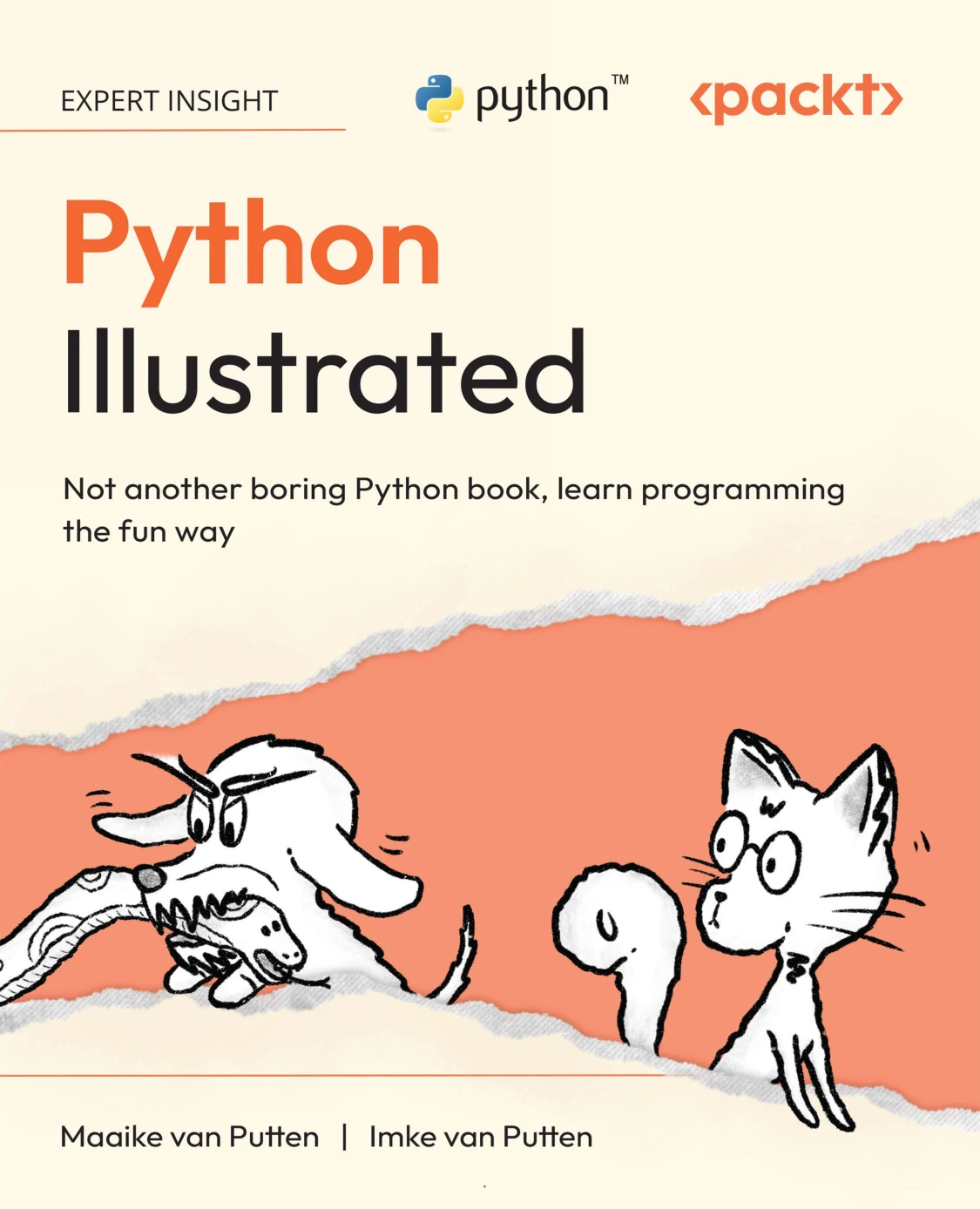
New programmers seeking visual instruction and help with their first development environment.
This makes it a reasonable first shortlist choice if dense explanations have made programming feel difficult to approach. The reason for considering it is its documented teaching format and introductory setup coverage—not a claim that illustrations improve outcomes for every reader.
Before choosing: if a sample is available, check whether you can move from its explanation to its code example without guessing what a term means.
100 Days of Coding in Python: for learners who want structure
100 Days of Coding in Python by Giuliana Carullo follows a day-by-day rhythm with theory and practice. The catalog lists basics, input and output, control flow, error handling, object-oriented ideas, algorithms, data structures, and design patterns.
Self-directed learners who want a paced plan with repeated coding practice.
Consider it if your main difficulty is deciding what to study next. A sequence can reduce that decision burden, but the title is not a promise that you will reach a particular skill level in a fixed number of days.
Before choosing: check the workload and exercise support. If a section takes several sessions, staying with it is more useful than rushing to preserve the calendar.
Basic Computer Coding: Python (3rd Edition): for broad foundations
Basic Computer Coding: Python (3rd Edition) by Lavinia Iancu covers setup, syntax, variables, types, and operators before moving into functions, modules, packages, collections, files, exceptions, unit testing, comprehensions, object-oriented programming, and regular expressions.
Basic Computer Coding: Python (3rd Edition)
Learners seeking a methodical progression from syntax into wider programming practices.
Its documented scope makes it a candidate for someone who wants to progress beyond first examples into broader programming practices. Testing is particularly relevant once you want to check that a program behaves as intended.
Before choosing: inspect how the book introduces new concepts. Extensive coverage is useful only if you can follow the progression at your current level.
How to learn effectively with the book you choose
Use one main book for your initial learning path. Keep other resources for specific questions rather than repeatedly restarting the same introductory material.
- Read one concept. Identify the problem it solves—for example, repeating an action or storing several values.
- Run the example. Check what happens instead of assuming the printed output tells the whole story.
- Change one thing. Alter a value, condition, or collection and predict the result before running it.
- Close the example. Try a related task without copying.
- Explain the result. Describe the program in ordinary language and note anything you still cannot explain.
Try a small expense-tracker project
An expense tracker gives you a practical task without requiring a web framework or graphical interface. Build it in stages rather than trying to create a complete application immediately.
- After variables and numbers: store a few expense amounts and calculate their total.
- After lists and loops: total a collection of expenses and display each entry.
- After conditionals: report whether the total exceeds a budget.
- After functions: separate the total calculation from the display logic.
- After file handling: save entries and load them again.
- After exceptions and testing: handle invalid input and check expected results.
A starting exercise might look like this:
expenses = [12.50, 8.00, 19.25]
budget = 35.00

total = 0
for expense in expenses:
    total = total + expense

print("Total:", total)

if total > budget:
    print("Over budget")
else:
    print("Within budget")
Before running it, calculate the total yourself and predict which message will appear. Then change the budget and add an expense. Finally, rewrite the program without looking at the example. This is a learning exercise, not a production-ready financial tool.
Avoid these common learning mistakes
- Reading without running code: understanding an explanation is different from producing a working program.
- Copying every solution: try first, then use hints or answers to diagnose the gap.
- Jumping into large frameworks too early: practise functions, collections, and errors in small scripts first.
- Changing books at every difficult chapter: try a smaller example before deciding the resource is unsuitable.
- Treating a title’s time frame as a deadline: measure progress by what you can explain and build.
Frequently asked questions
Which Python book suits someone who has never programmed?
From the supplied catalog, Python Illustrated is a sensible starting candidate for someone seeking visual explanations and introductory setup guidance. Choose 100 Days of Coding in Python instead if a paced practice structure matters more to you. Check a sample and prerequisites before deciding.
Can the official Python tutorial replace a beginner book?
It can be useful, especially for someone who already programs. However, the official Python tutorial explicitly assumes a basic understanding of programming. A complete novice may benefit from a resource that spends more time on those underlying concepts, while using the tutorial as a supplementary reference.
Should I choose a project-based book or a reference guide?
For your first learning path, favor guided explanations with exercises or projects. A reference guide helps you look up syntax once you know what you are trying to do; it does not necessarily explain why or when to use it. You can add a reference later without making it your main curriculum.
Does a “seven days” title mean I will master Python that quickly?
No. A title can describe a suggested study schedule, but it does not establish a learning outcome. You may work through introductory material quickly and still need substantial practice to write, debug, and extend programs independently.
Do I need several Python books to get started?
No. Start with one suitable main resource and the tools it requires. Add another book when you can identify a specific missing need, such as extra exercises, file automation, or application development—not simply because another title looks more comprehensive.
Make the final choice by learning style and goal
Choose Python Illustrated if you want visual explanations and a guided start. Choose 100 Days of Coding in Python if you want a practice sequence. Choose Basic Computer Coding: Python (3rd Edition) if you want broad foundations that extend into testing and other programming topics.
Then stop comparing for a while and write code. The useful test is whether you can run an example, change it deliberately, and solve a small related problem yourself.
For further discovery, browse the Python books and learning resources at Digital Delights. Use your current learning need to narrow the options rather than collecting several overlapping introductions.
Sources and recommendation basis
Catalog recommendations are based on the supplied Digital_Delights_product_1008_1235.xlsx product descriptions and metadata; the relevant listings are linked above. The comparisons and prerequisite guidance use the linked publisher descriptions for Eric Matthes, Al Sweigart, and Paul Barry, plus the official Python tutorial.
These sources establish stated audience, format, and topic coverage. They do not establish comparative teaching effectiveness, completion rates, or compatibility of every project with current software.